
There now follows a quick run through of how you go about wirelessly updating your BlackBerry. The total process took just under an hour. This was a BlackBerry 9000 updating from 4.6.0.266 to 4.6.0.301.
What's really annoying is that there's no automatic propt to tell you there's new firmware. I wonder how many people out there are cursing their BlackBerry without realising that a simple firmware update will give it a new lease of life.
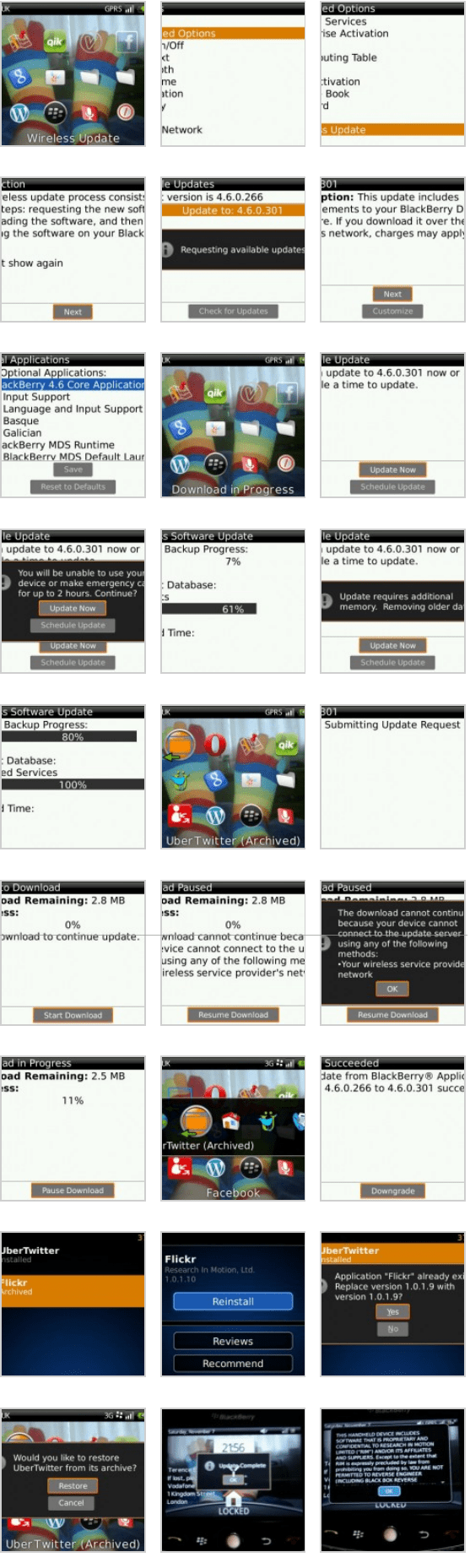
The process worked more-or-less flawlessly. Just make sure you're fully charged and prepared to wait an hour.


2 thoughts on “BlackBerry Wireless Update”
Kevin
When you were doing your update, did the blackberry have a black screen and the red LED light on for a long time? I'm doing wireless update now, and am quite nervous because of the apparent inactivity...
It is normal for it to spend a few minute with a blank screen. Make sure that your device is plugged in to some power.
If it hasn't recovered after an hour, try pulling the battery.
If that doesn't work use JL_Cmder. It's a utility which will factory wipe your device and allow you to update the firmware using BlackBerry Desktop Manager.
Good luck!